Explain
EdWard provides a powerful Explain feature that allows you to understand exactly how your entitlements—such as overtime, ordinary hours, and allowances—are calculated. This feature ensures full transparency, helping you verify that your pay and entitlements are being calculated correctly under your award or enterprise agreement.
Accessing the Explain Feature
You can access the Explain feature in two ways:
- From the Timesheet Table:
- Click on any underlined item in the Work Summary or Total Entitlements headers.
- This will bring up a modal that explains how that specific entitlement (e.g., overtime) is calculated.
- From a Time Entry:
- When adding or editing a time entry, you can click on an entitlement in the summary section.
- A modal will pop up to explain how that entitlement is calculated.
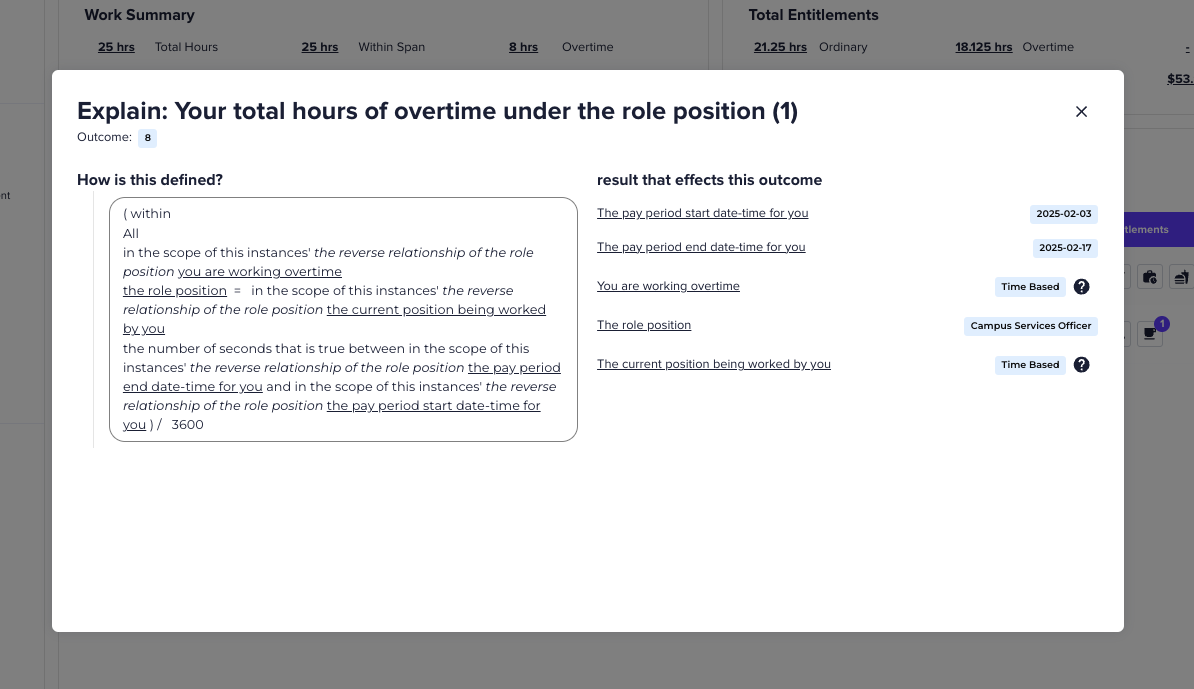
Understanding the Explanation Modal
When you open the Explain modal, you’ll see two sections:
Left Side – How This Calculation is Defined
- Displays the rules used to determine your entitlement.
- This will differ depending on the specific rules, but is taken from the Enterprise Agreement/Award/Ohter legislation and shows relationships between different factors like:
- Your role and position.
- The pay period.
- Whether you qualify for an entitlement based on hours worked.
Right Side – Inputs That Affect the Outcome
- Lists all factors that contribute to the calculation.
- These will differ based on the specific entitlement you are looking at, and your configuration, but some examples include:
- Pay period start and end dates (e.g., 2025-02-03 to 2025-02-17).
- Whether you are working overtime (Time-Based).
- Your assigned position (e.g., Campus Services Officer).
Each of these inputs may also have underlined links that allow you to click further to explore how those values were determined.
Exploring Time-Based Calculations
Many entitlements, such as overtime, penalties, or shift loadings, are time-based—meaning they change depending on when and how long you worked.
How to View Time-Based Changes
- If a value is marked “Time-Based”, you will see a small question mark (?) icon next to it.
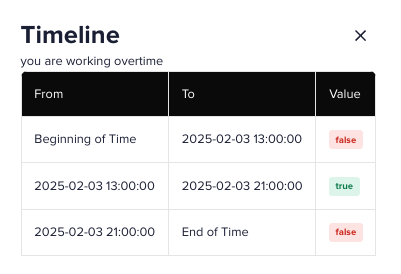
- Clicking this will open a Timeline Table which shows how that value changes over time
- This helps you understand how your entitlements are determined over time and can help answer questions such as why only certain hours of your shift qualified for overtime or penalties.
Key Features and Notes
- Transparency – Understand exactly how your entitlements are calculated.
- Verification – Confirm that you’re being paid correctly under your agreement.
- Clarity – See how changes in your hours or position impact your entitlements.
- Self-Service – Get answers without needing to ask HR or Payroll.
By using the Explain feature in EdWard, you have complete visibility into your entitlements and can ensure your timesheets are accurate before submission.