Delegation
The Delegation Assignment feature in EdWard allows an employee to assign another employee to act on their behalf. A delegated employee can log in, switch to your profile, and perform actions on your behalf, such as:
- Creating and submitting timesheets
- Approving employee timesheets (if you are a manager)
All actions performed by a delegate are tracked and recorded for accountability.
Assigning a Delegate
To assign a delegate who can act on your behalf:
- Navigate to the top-right menu and click on “Act As…”
- In the dropdown, select “Delegations”
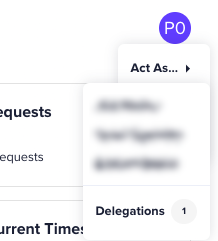
- A window will appear, allowing you to assign a new delegate.
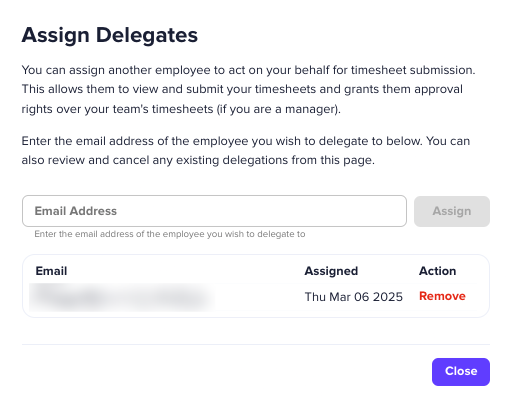
- Enter the email address of the employee you wish to delegate authority to.
- Click “Assign”.
Once assigned, the delegate can now access the system as you and perform tasks on your behalf.
Removing a Delegate
You can remove a delegate at any time:
- Go to the “Delegations” menu (as described above).
- Locate the assigned delegate in the list.
- Click “Remove” next to their name.
Once removed, the employee can no longer act on your behalf.
Acting as Another Employee
If someone has assigned you as their delegate, you can act on their behalf:
- Click on the “Act As…” button in the top-right corner.
- Select the employee you want to act as from the dropdown list.
- The system will switch to their profile, and you will see a yellow banner at the top of the screen with their name, indicating that you are now acting as them.
When acting as another user, you can:
- Submit timesheets on their behalf
- Approve employee timesheets (if applicable)
- Access features as if you were that user
Important Notes
- All actions are logged to maintain accountability.
- You can switch back to your profile at any time by clicking the "x" icon on the yellow delegation bar.
- You can only act on behalf of users who have explicitly assigned you as a delegate.
Troubleshooting
If you cannot assign a delegate, ensure:
- You have entered a valid email address.
- The employee is registered in the system.
- You have the necessary permissions to assign delegates.
For further assistance, contact your system administrator or EdWard support.
Note: Some functions cannot be assigned through delegation (eg: you can't assign someone to be an administrator). These functions must be completed by the original user.